


Many basic ways to improve your Wi-Fi network are available, such as placing the router in the center of the area you want it to cover, keeping the router away from metal objects that could block the signal, or making sure there aren?t too many other radio-enabled devices broadcasting on a 2.4GHz signal (standard for most older routers). But other ways to improve your signal may be a little less apparent. Here are some of those tricks (feel free to add your own workarounds in the comments below).
Check Your Speed
Although most people can gauge if their home wireless is too slow or not, checking the speed of the connection will let you know for sure whether you?re within range of the speed promised by your provider. Downloading a lightweight piece of software like LAN Speed Test gives you upload and download speed numbers in megabits per second (mbps), which you can check against your ISP?s promised speed to see if your network is actually slow or if you just need to pay for faster service. You?ll probably need to run the test multiple times and at different times of the day to get a real sense of how fast your Wi-Fi is overall, as crowding on the 2.4GHz spectrum could cause slowdown during the busiest times of the day for Internet traffic.
Change the Channel

First you?ll want to go into the router?s graphical user interface (GUI), by typing the router/gateway address into the address bar in a browser window while your computer is connected to the router?s wired or wireless network. You can usually find the router?s address on the router itself, in the instruction manual, or online if all else fails. For example, if you have a D-Link router, you?ll type http://192.168.0.1; if you have a Linksys, you?d type http://192.168.1.1. The browser will prompt you to enter your user name and password.
The exact navigation through the GUI for each router is different, but once you find the router?s wireless options (usually under headings like ?LAN? or ?Network?), you should see a ?wireless channel? option. In North America, you can broadcast from channels 1, 6, and 11. Try switching to one of those three channels that?s not currently in use and see if it speeds things up.
Add Some Hardware
Changing the actual hardware that makes the wireless signal waft through your house is an easy way to strengthen a wireless signal throughout a larger area. While most routers come with omnidirectional antennae (meaning they broadcast signal in all directions), you can also invest in a single-directional antenna that should double the strength of your signal, but only in one direction. This is great if you must place your router by a wall, and you don?t want to waste resources transmitting half of the wireless signal through the wall or window. Single-directional antennae can cost anywhere from $20 to $120.
Wireless repeaters do a similar thing, basically just repeating the signal put out by your router and helping you cover more space with Wi-Fi. These also cost around $20 for a low-end repeater, but if you?re up for a little DIY you can make your own wireless repeater for free by uploading custom firmware from DD-WRT to an old router (step-by-step instructions here, and an explanation of DD-WRT below).
Another hardware-related change: if you have multiple rooms you need to cover with your signal, consider buying a hybrid Homeplug/ wireless router device. Homeplug technology uses the AV line in your house to transmit broadband signals to other rooms, and if you include a wireless router on the adapter, you?ll have a Wi-Fi signal right there in the room with you.
Check Who?s on Your Network
You never want to leave your wireless signal without at least some sort of protection, and it?s worth noting that there are different levels of security on every router. Again, you?ll want to go to your router?s GUI and check its wireless security settings. Often, there will be a drop-down or click-to-select menu to allow different levels of security. WEP is the weakest form, and is easily broken; WPA is much more secure; and while WPA2 is the most secure, it can sometimes be incompatible with older devices on your network, so WPA is probably the best bet if you?re not sure what you want.

If you do find intruders, you could change your wireless password, or some routers will allow you limit the number of devices that can connect to your network. Of course, there are programs out there that will allow you to triangulate the location of the moochers based on network signals. While the legality (and sanity) of trying to track down people who are using your Internet is questionable (and not sanctioned by PCWorld) there would probably be nothing wrong with knocking on your downstairs neighbor?s door and politely asking them in person to get off your Wi-Fi. There is, of course, the famous ?Upside-Down-ternet? gag, where you turn the Wi-Fi thief's browser pages upside down, or make their browser pages blurry, or replace them with kittens! While it sounds fun, it?s a pretty advanced trick, so the average user might want to switch to WPA security and password-protect the network instead.
Adult Site Blocking With Open DNS
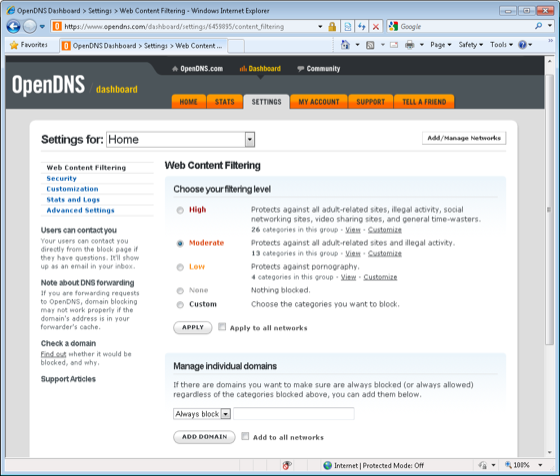
OpenDNS doesn?t even require that you subscribe with them (the free version is ad-supported). Simply go to your router?s GUI and switch from an auto-generated IP address to a static IP address; then in the fields for DNS (there are usually 2 to 4 spaces for you to add a DNS lookup number), enter OpenDNS?s look-up numbers, which you can find on the OpenDNS site. Doing this from the router, rather than just configuring OpenDNS on a specific computer, will protect all the computers connected to that router.
Install Updated or Custom Firmware
If you have an older router, or the settings on your new router don?t offer all the functionality you?d like, try upgrading your router?s firmware. Often, your router manufacturer will have firmware updates that you can easily download from the manufacturer?s website. And if you really want to supercharge your router, you can even upload custom firmware provided by DD-WRT.
While a lot of newer routers offer out-of-the-box DD-WRT compatibility, you can check on the DD-WRT website to see if your older router is compatible with the custom firmware. Upgrading can mean better firewalls, the ability to designate how much bandwidth each device on your network gets, and even client isolation, so that wireless users can connect to the network without being able to see each other (an important part of hosting a public access point). Follow the directions on the site to flash your router with DD-WRT, and then use it to modify your router to fit your needs.
Hybrid Modems/Routers Aren?t Off Limits
If your Internet service provider requires that you install a hybrid modem/router, you can try adding another router onto the system to get different functionality.
When I moved into a new apartment recently, I decided to subscribe to AT&T Uverse, which uses fiberoptic cable to bring the Net to your computer. AT&T requires subscribers to use a hybrid router/modem, and in my case the company installed a 2Wire 3800HGV-B modem/router. The Wi-Fi was okay, but the device had an 802.11g wireless access point, and I wanted to try my newer TRENDnet TEW-691GR router, which had an 802.11n access point.
In order to broadcast wireless from the TRENDnet router, I modified the two routers to work with each other. First, I went to the 2Wire?s summary status page, and under ?Internet Details? recorded the primary and secondary DNS numbers, and also the range of the IP addresses listed under ?Private Network DHCP info?, which in this case happened to 192.168.1.64 - 192.168.1.254.
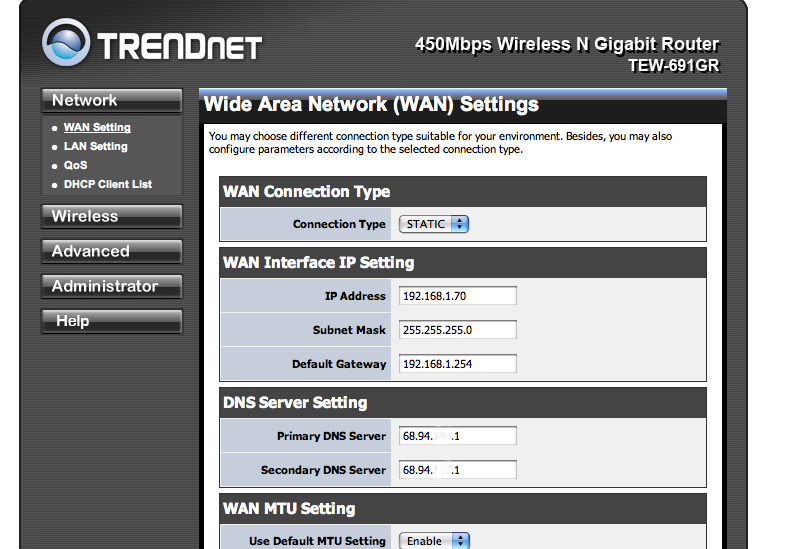
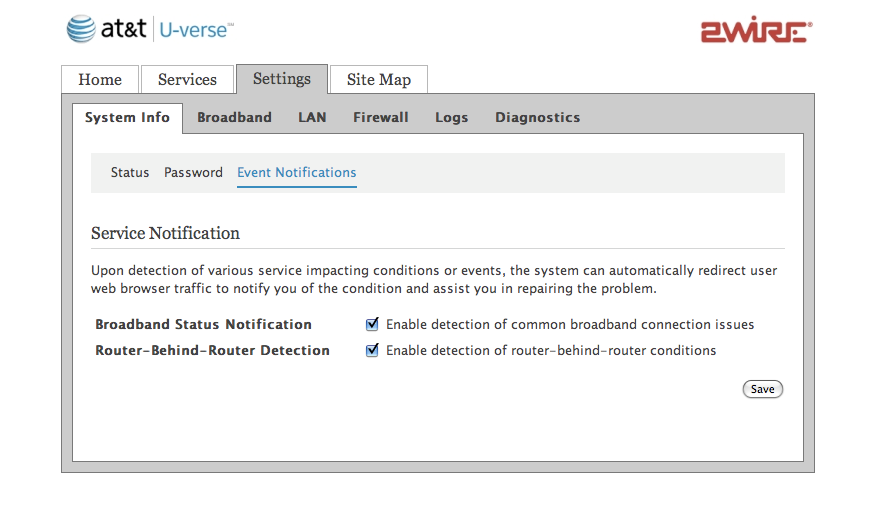
With the TRENDnet router still connected by a LAN port to the 2wire?s LAN port, both devices should be on and giving a wireless signal. When you can connect to both wireless networks successfully (you may have to close out of your browsers or do a ?power cycle? by turning both the routers on and off), then you can go into the 2Wire?s modem/router menu and disable the ?wireless? tab.
At this point, no wireless signal is coming from the 2wire, and all of the wireless transmitted in my apartment is at 802.11n standards. This workaround seemed to make my wireless slightly faster, but more unreliable. The network connection would suddenly crash, but when it was up and stable I seemed to be able to download videos faster. I would recommend activities of this type for experimentation only, as I ultimately just went back to the more stable 2Wire wireless network.
Source: http://feeds.pcworld.com/click.phdo?i=667bd6a554ffe25c1649caac53c7b576
A charter school teacher warned her third graders that a standardized test question was ?tricky,? and they all changed their answers. A high school coach in Brooklyn called a student into the hallway and slipped her a completed answer sheet in a newspaper. In the Bronx, a principal convened Finish Your Lab Days, where biology students ended up copying answers for work they never did.
These are among the 14 cases of cheating by educators substantiated by New York City?s special commissioner of investigation for schools since 2002. They represent a tiny fraction of the more than 1,250 allegations of test tampering or grade changing that the special commissioner has received since Mayor Michael R. Bloomberg took control of the city schools ? most are handled by the Department of Education, which has declined to provide a full accounting of its probes. But as cheating scandals have engulfed school districts in Atlanta and Washington, D.C., as well as New Jersey and Pennsylvania, a review of this relative handful of substantiated local cases shows that cheating schemes can be mundane or audacious, with motivations that include inflating the statistics that are used to evaluate a school, and helping a favorite student become eligible to graduate.
They portray stressed educators who take inappropriate risks ? and brash ones who appear to believe they can flout rules with impunity.
Three of the cases were announced as they were completed by the special investigator, Richard J. Condon, including one that led to the ouster of Ruth Ralston, an assistant principal at the High School for Contemporary Arts in the Bronx, who investigators found had erased hundreds of student answers on the June 2008 algebra Regents exam. Documents related to the other cases were provided to The New York Times under the Freedom of Information law. Of the 23 educators named in the investigations, about a third have resigned or have been fired, sometimes after an administrative hearing that is required for those with tenure.
Jooyeon Kim, a third-grade teacher at the well-known Harlem Children?s Zone/Promise Academy I, for example, was dismissed in 2009 due to two words: ?Alligator Park.?
Ms. Kim?s students had been asked to correct the punctuation in a paragraph on the state?s English test in January 2009 that included this sentence: ?We saw alligators at an alligator park.? City testing officials noticed that each of her 22 students had made an identical change: first capitalizing both the A and the P in ?Alligator Park? (incorrect), then erasing it.
They began an investigation, and Ms. Kim, who could not be reached for comment for this article, ultimately acknowledged that she had warned the children, ?You?re on the last question, be careful,? saying it was ?tricky.? Eight of the children confirmed her account, though investigators did not find evidence that she had actually given them the answer.
Teachers at Promise Academy, run by the billionaire investor Stanley Druckenmiller and Geoffrey Canada, are not unionized, so it was easier to fire Ms. Kim than it would have been at a traditional school. ?Although we had no hard evidence,? explained Marty Lipp, a spokesman, ?the soft evidence led us to make a decision to let her go, because we can?t and won?t tolerate cheating on the tests.?
By contrast, only one of eight educators whom investigators said had participated in a ?herculean and dishonest? effort at the High School for Youth and Community Development in Brooklyn to give students answers before the 2005 biology Regents exam was fired. The others received reprimands.
?Students were not merely permitted but were openly encouraged to cheat,? investigators wrote of the case, in which students were given answer keys to copy instead of completing required lab experiments in the days and hours before the exam. Several teachers said that the principal, Marie Prendergast, had known about the copying, but investigators found conclusive evidence only that she had failed to properly supervise her staff. She received a counseling memo.
?It?s something my staff did,? Ms. Prendergast said in an interview. ?I have a different organization, that was an unfortunate incident, but that is not my school now.?
She added, ?Why are you going to crucify me for something that I was called green and stupid for, but I was exonerated??
| Live and learn in Oxford for a year or a semester |
| Find out the specific pattern women follow when they're cheating |
josephine baker philadelphia maratho... philadelphia maratho...


